Showing posts with label technology tips. Show all posts

Friday, December 2, 2016

Android phones and gooligan malware -Don't Panic

Gooligan malware and android phones.


A couple of days ago it was in announced that Google has suffered a massive malware infection affecting over one million android users across the globe.

A security firm named Check Point Technologies was the one the found this malware and announced it. There is a website they have posted where users can enter the email account they use for  google (usually is a gmail account) and it will let the users know if the account has been compromised.  Below is the link.

Gooligan Check Point

Tips for today:

DON'T PANIC

1) If your phone or tablet is running androig 6.0 (marshmallow) or newer, then it is not affected.
2) Moreover if you only install apps on your phone from the google play store and don't install apps from third party places then more likely your account hasn't been compromised.

WHO REALLY NEEDS TO WORRY?

If you own an old phone (running android 4.0 kitkat or 5.0 lollipop ) and are the kind of user that likes to jail brake the phones or install apps from third party app stores (other than amazon) in order the get free apps that are supposed to be paid. Then you might be infected.


I want to wish everyone Merry Christmas and a Happy New Year 2017.

See you soon with more tips :)

Monday, October 12, 2015

To upgrade? or not upgrade?....

Check before you upgrade to Windows 10

I have heard from a few users and friends that after upgrading from windows 7 to windows 10 (without asking me first!), they are experiencing some problems with their computer display.  They just couldn't resist the temptation :)

If your computer is running windows 8.1 more likely you will be ok to do the upgrade.  But, if it is running windows 7, then i would really check that the manufacturer of your computer has drivers for your device for windows 10.

Most of the cases they were able to make the computer work, but the resolution of the screen was below the recommended causing them not to be able to see some of the components on some windows.

So my tip for today:

If you are not sure if your computer can run windows 10, it is better to ask before upgrade. Also, since it is so new, maybe it will pay to give the manufacturers a little time to catch up.

see you soon with more tips.


Wednesday, August 19, 2015

They work together ! google drive plug in for Microsoft Office

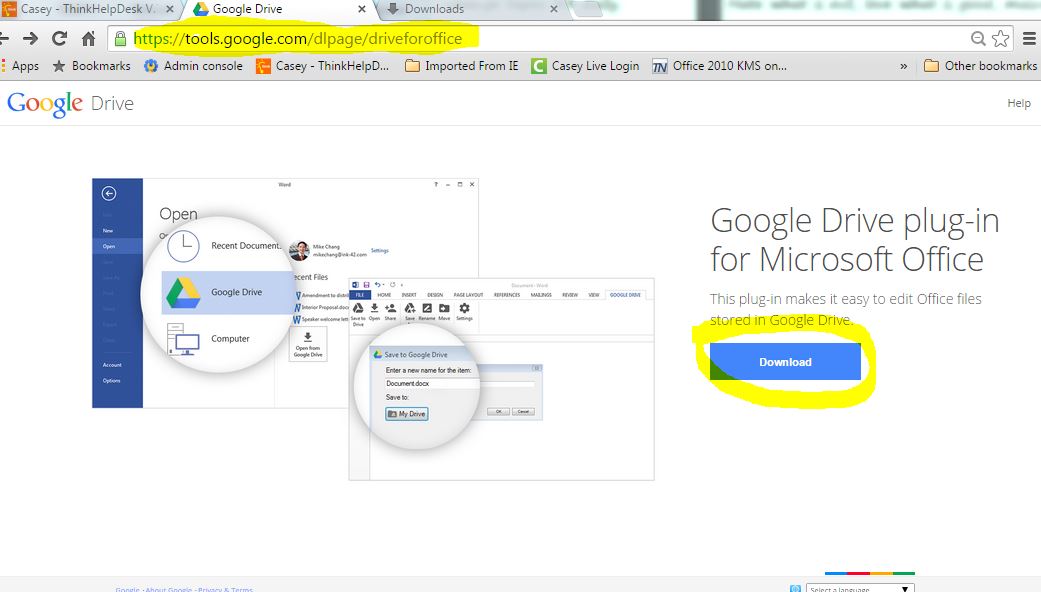
There is a new google drive plug-in for Microsoft Office


google drive plug-in
I was checking what is new in google Apps for education and I came across with this new plug-in. You wonder, what is a plug in? well a plug in is a software component that adds a feature to an existing software application.

So this plug-in will allow users to open and save files to their google drive from any Microsoft Office application.

That would save the user time since they won't have to open a browser, download a file then edit it, and finally upload it again.

Below is the address:

https://tools.google.com/dlpage/driveforoffice

So my tip for today:

If you are running office 2013 or Office 365 as part of a subscription and have files stored on google drive, give it a try.


Tuesday, June 30, 2015

Gearing up for next school year

During summer we get ready for next school year.


working during the summer
While students and most of the staff takes the summer off, we technology people and other staff (maintenance, grounds, board office, etc) stay working through the summer to make sure we are ready for the next school year to start.

I am sure pretty soon there will be teachers coming in and out of their classrooms as the month of july goes by. I have worked in the school system for almost 10 years and it is always exciting for me getting ready for the first day of school. It is stressing too :) but we have survived it every time.

My tip for today is:

Enjoy your summer students, in the mean time we will get ready for the next school year!


Tuesday, June 2, 2015

By-By old Technology......

You did a great job but now it's time to part ways.


With the school year over, we start our summer replacement projects.

By by E-scrap 
So long old technology, a new windows is on its way and you won't be able to handle it.  Microsoft just announced yesterday that they will release Windows 10 to the public in July 29th.  We can't wait for it!

Looking at this pile of workstations reminds me of many users and friends that won't part with their old workstations. After all they have put hard earned money on it.

Unfortunately technology never stops, so even when the hardware part is still on running conditions, if we want to be productive and able to accomplish some work, we must depart from old technology. I know of people still holding up to Windows XP.

So my tip for today,

Whatever old technology you have in your house that is just collecting dust and using space, it is time to move on. The old excuse that 'we can let our kids to play with it', it is not realistic since most games are online and need updated browsers and plug-ins. Say by-by to old technology and have a great summer 2015!

See you soon with more technology tips.


Thursday, April 2, 2015

What really is behind the "like and share" posts on facebook

By liking and sharing you might be helping scammers.


Have you ever noticed facebook posts that claim to be giving away stuff (like iPhones) and the only think you need to do is like and share, and maybe comment?.


like and share scams
I see them all the time and always wonder why some of my friends will fall for something obviously too good to be true. It's like those emails that you needed to resent to so many more in order to get a gift card or laptop or whatever.

And you might thing "oh well what does it hurt?" . Actually, you might be helping a scammer to do what is called "likes farming". They do that because after collecting so many likes and activity on facebook page, then, they can sell it on the black market to another scammers or for marketing dubious products.

You see, when you like a page, they you will start getting updates from that page (free marketing) and also your friends will see what you have liked and they might fall in the scam too.

So, my tip for today:

In facebook as is all things if life, if it seems too good to be true, it probably is a scam. Let's all stop scammers.

see you soon with more tips. 

P.S.   go ahead and like and share this post :-) 


Monday, March 30, 2015

Managing power and electical cords NO NO 's

Avoid damaging your equipment - manage your cords properly.


When setting up our office and desk, it is important to take in count that most of our office equipment requires electricity.

Consider this when placing your desk on your office. Unfortunately most of the power cords have a limited length making us basically solve a puzzle when setting up equipment. I understand we need space on our desk to write and to work but the computer and electronic equipment is very costly too.

 Stretching and bending cords damage them and in the long run they will damage our computers / electronics.

So my tip for today:

Avoid twisting, bending and stretching power cords or cables. Put the power cords on a place that it is not crowded and make sure they are not going to be mashed or bent by other piece of furniture. When rolling up the cable of an adapter procure not to bend it. Take care of your investment.

see you soon with more tips.


Wednesday, January 21, 2015

A list of passwords to avoid.

The list of the most common passwords and thus the easier to hack.


Last night I was watching the news while cooking dinner and there was this news that capture my attention.

worst passwords of 2014
It was a list of the worst passwords for the year 2014 and the number one was "123456" and second in the list was "password". The worst part was when Ryan Williams said that those where the perennials in the list. The list is published by Splahsdata and company dedicated to security applications and services.

They came out with such a list by compiling from more than 3.3 million leaked passwords during the year 2014. The compiled info came mostly from North America and Western Europe.

My tip for today:

Although  the name password suggest "word" it is better if we think about a pass phrase. That means 2 or 3 words and numbers to make a most secured password. For example 2hot2handle or AuntLucy0hi0. Use phrases that mean something to you so you can remember them and include numbers or symbols to add difficulty.

see you soon with more tips.


Monday, December 22, 2014

It's almost Christmas day!!! can't wait

Before making a purchase, it is good to do some research.


For this Christmas, I got myself a new vacuum cleaner.  After a long research of around 3 months I finally "bite the bullet" and made the purchase.

I
can't wait!

A friend of mine owns an old kenmore canister vacuum cleaner that she had got on Sears long time ago and I had used several times and really like it a lot. So from the time I moved to my new home I have been thinking about acquiring a vacuum cleaner but I wasn't able to find one just like hers.

I did my research and found out that Electrolux would be the closer to her vacuum.

It took me a while because on the other hand she also owns a Dyson and they are without doubt the best rated vacuums in the market but with a much higher cost.

At the end, and after reading hundreds of reviews and even watching videos on youtube I decided for this particular vacuum electrolux ultra active. I got it on sale for almost half the original price on walmart.

I, like Rockie, couldn't wait and got it out of the box this weekend and use it around my house. I am very happy with my purchase :)

so the tip for today:

Do your "homework" or research before making a large purchase. There are a lot of sites that offer reviews about everything you want to buy. Avoid reading the 5 stars or 1 star reviews. I always read the 3 or 4 star reviews that will tell you the good and the bad.


Merry Christmas and Happy and Prosperous New Year!!


Tuesday, December 9, 2014

Keep your billfold in your pocket and Feliz Navidad !

If you are planning to buy a new PC maybe it will pay off to wait

As usual on Christmas time, I have received a few calls about suggestions for what computer to buy as a Christmas gift. I know there are a lot of sales and some are really good deals. However it might be a good idea to wait.
christmas gift

The computers now are being sold with windows 8 or 8.1 that most users dislike and in some cases some companies offer computers with windows 7 pro installed and with a free upgrade to windows 8.1. Which the user will have to install himself.

Although windows 7 pro is a really good option, there are some features that doesn't work as well on windows 7 as on the newer version windows 8.1.

So my tip for today:

If it is possible for you, wait for Windows 10, it is supposed to come out on late summer or early fall 2015.

see you soon with more tips.


Thursday, November 20, 2014

what career or major to take?

Being prepared for the future includes having technology skills.


#futureready
I was checking on my twitter and I came across the hashtag #futureready.  It is related to a president initiative name ConnectED. The main idea of this initiative is to prepare american students with the skills they need to get good jobs and compete in the global economy demands.

That really captured my attention. It is really important for students to be ready to face a labor force that will require them to have technology skills.  Not only be able to use iphones and ipads and all those devices they comfortably use but to be able to be productive with them.

I have heard young people make comments that they don't like technology or computers because they don't like math or feel that they are inadequate because their grades in math are not as good, etc. Also, students are picking a career or major basing their decision on those fears.

Independently of what career path students chose, they will have to have computer skills. We all need to encourage kids to be future ready and in fact to select technology or any other STEM career.

The punch line today, while I was encouraging a student to pick computer science as his major instead of social studies, it was the fact that many people complain about calling tech support of any kind and always getting someone with a foreign accent, so I told him,  you have to power to change it! you all need to pick computer science.

So my tip for today:

Don't be afraid of technology, stay on top of it!

:)

see you soon.


Thursday, November 6, 2014

The problem with the chromebooks.... is it really a problem?

The biggest complaint about chromebooks.


The problem with the chromebooks?
The biggest complaint people have made about chromebooks is that they only work with an internet connection. That is not true. There are some things that can be done offline. Yes it is very limited what you can do off line but to be honest, i don't know many people that owns a computer, ipad, etc. that uses them to work offline.

The other complaint I have heard is from the people that travels a lot and want to get some work done while flying. That is not a problem anymore because airlines offer wi-fi internet on their flights nowadays.

I our school district we have deployed 500+ chromebooks to students. We have wifi coverage on all our buildings. The students love them and can actually produce finished products on them like presentations, videos, documents, websites, blogs, etc. The price is very accessible, they come with a keyboard and webcam and they are so easy to use.

Are they the same as a PC? of course no, that would be comparing apples to oranges. 
Are the iPads cooler than them? maybe, but their price by the time you include a keyboard is almost un-affordable in this economy.

So my tip for today:

Don't let the fact that chromebooks need a internet connection to work best make you ignore its advantages. Christmas is coming we all need to be wise with our budget too. 

see you soon with more tips.


Tuesday, October 21, 2014

Where did i Put that Email? ...Skip the Email, just share it on your google drive.

Advantages of using Google drive or other shared spaces.


I would like to list some reasons to start using cloud storage and stop using email as your only collaborating tool.

Where did i put that email??

  • Space limitations. Must emails have a quota of how much data can be sent through an email. So if you have a large file or picture, it is not possible to send via email.
  • Different versions of the same document. Sometimes while collaborating the document that is being work on has several revisions or versions and it would be hard to keep up with which is the latest version when you have several email with attachments and worse if several people is modifying the same document. On a shared document it is only one document that is online, and of course that would be the latest version.
  • Save one log in. This might not apply to everybody, but in our district, students that use chromebooks, have to log in on wifi, then to their google account and since the only email they can access is the one provided by the district (microsoft) then, there it goes another log in if the document is sent by email. However if it is shared, they would be able to see it on their google drive without having to log in.
  • Privacy settings. The user that shared the file can decide who can view or who can edit the 
  • Better organised. It is a bad practice but users tend to use their email as a cloud storage and then have a hard time trying to keep up with it.
I am sure that there are other advantages that i didn't cover but those are all I could come up with really fast.


So my tip for today:

Stop using your  email as a cloud storage.  Start using your google drive or one drive, after all they work better for collaborating and they are free :).

See you soon with more tools.


Monday, September 22, 2014

what is the cloud???

About the cloud and other storage. 


I love that commercial where a woman ask "Where is the cloud? Are we in the cloud?". So I thought it would be nice to talk about Cloud Storage.

Cloud storage is internet base storage or put in another terms, it is storage that you access through internet. "The cloud" is just a metaphoric name for internet computing.

Is this the cloud?


There are several companies that offer free cloud storage as: iCloud, Dropbox, Onedrive, Google Drive, and many more. They are all different but at the same time they offer the same, storage space that can be accessed over the internet.

And you might wonder why would people store their information on the cloud? well, it makes it easier to share files between your different devices, as your computer and mobile devices. Also, it gives you the opportunity to access your files from any computer as long as you have access to internet and can remember your log in and password. And you could also share files and collaborate with other users.

As many users I have seen having problems with corrupted or ran over flash drives, I would really recommend them to give cloud services a shot.You could still use your flash drives as a secondary backup option.

Which one is the best? they all have their pros and cons.

My tip for today:

 If your current email service provides cloud storage, then, than would be your best option because at least you already know that user name and password.

See you all soon with more tips.


Wednesday, September 17, 2014

It's like magic....isn't it?

When users see the computers just as a black box.

It's like magic

For some users computers are like a black box that works like :

input -> blackbox -> output.

They don't really know how it works or what make things work the way the do. I remember meeting a young lady that said to me "computers are like magic to me". I guess it gave me a lot of insight of what some users perception of computers is.

It does seem like magic now with the new operating systems, but there is a lot of engineering inside those black boxes and a lot of processes going on before and after every click the user makes.

What to learn more about what goes on inside the black box?  then keep reading my blog.  :)

See you soon.


Wednesday, September 10, 2014

All roads lead to Rome.

When working with technology if it doesn't work one way, try another way. Do not get stuck.

When personal computers first started, the user used the command line to input commands one at a time and it was easier to have a written procedure to follow from beginning to end. It is not like that anymore. Now users can reach the same results following different paths or methodologies. We just need to be more flexible and creative.

A good example of what I am talking about is all the different browsers now available. For example the most popular ones are: internet explorer, fire fox, chrome, safari. There are more out there.
I have noticed that some websites work better in ie and others prefer chrome or firefox or safary. So, when facing problems with display on certain websites, it is a good idea to try a different browser.  I wouldn't recommend to have 4 different browsers on you computer but you can pick 2. I would have IE and another of your preference (chrome or firefox).

Users tend to have a preferred browser and it is just that they are used to it, their layout, colors, etc. But as i have said, in this day and time it is best to be flexible and just try different ways to accomplish the task. 

So my tip for today:  Be flexible and don't get stuck. :)


Wednesday, September 3, 2014

Who you gonna call?

When facing computer problems, Who you gonna call?


As a user myself, I sometimes face issues with software I am trying to use or deploy. As part of education system,  we tech people also have a helpdesk support in Frankfort we could call if needed. However, it is important to know whom to call. When it is a internal operations issue we call our helpdesk, otherwise, when it is a software application issue, then we need to call the software company support.

I  know it is a fine line and I guess as a user calling your own tech support would be the first option for most users and that is ok. 

My Tip today : There are several sources of help we could use.

  • GOOGLE IT. Don't underestimate the power of "googleing".
  • FAQ. In most websites they have a FAQ (frequently asked question) sections where they have posted questions and answers to common questions.
  • FORUMS.  most software companies also have forums where users can go and post issues they are experiencing and they get answers from other users.

Of course when all this options fail, call me :D, but don't be like some users that work for 2-5 days and call everybody on their contact list and then, when the level of frustration is 200 (on a scale from 1-10), they call tech support.... It is hard for us too.

Hope these tips help you and I'll be back soon.


Thursday, August 28, 2014

Always, always log off

Students : always, always log off.


always log off

This is a very important rule to follow, students should always log off or sign out of the workstations they have been working on. By doing so, they would be sure that nobody else will delete files from their network drive or browse inappropriate internet sites using their credentials.

Also, when a student leaves a workstations and they are still logged on, it uses resources from the computer making it slower,  and sometimes locking the computer so it has to be forced to shutdown for other user to log in.

Our user credentials leave a footprint in all that is done on our network and internet too. User credentials is in a way a signature, so it must be treated like that too.

So my tip is : LOG OFF

It takes some of your time to log back in but I assure you it is worth it!